Cloudflare Stream is the pick if you have a developer and want cheap, predictable, global video delivery on a network that will not buckle under load, and you are ready to build the VSL conversion layer yourself. It is not a sales-video player out of the box.
By Mara Vance, reviewed by the VSL Host Report desk. Updated October 2026. Prices verified with the vendor.
The verdict
Cloudflare Stream is the pick if you have a developer and want cheap, predictable, global video delivery on a network that will not buckle under load, and you are ready to build the VSL conversion layer yourself. It is not a sales-video player out of the box.
You have heard of Cloudflare Stream, most likely because you already run something on Cloudflare, and the question underneath the question is the honest one: is this a real, maintained video product, or a side feature you will outgrow the moment your sales page starts converting? The short answer is that Stream is real and backed by one of the largest networks on the internet. Cloudflare says its infrastructure sits in front of about 20% of all websites, and Stream runs on that same network. The longer answer, the one that decides whether you will regret buying it for a VSL, is about what Stream is built to do and what it leaves entirely to you.
We judge every host on a single job: turning a video sales letter into sales on cold paid traffic. On that test Cloudflare Stream is an outlier, because it was never designed for it. It is a managed video pipeline built for developers. Whether that makes it the right buy comes down to who is doing the buying and what they can build.
What Cloudflare Stream actually is
Stream takes the messy parts of video and hides them behind one API. You upload a file or push a live feed, Cloudflare encodes it into multiple resolutions, stores it, and delivers it from its global network through a built-in player or the raw HLS and DASH files for a player of your own. Live streaming uses RTMP or SRT ingest and comes out as HLS or DASH, so the same product handles both a recorded sales video and a live event.
The pitch is simplicity. One vendor, one API, one bill, with no stitching an encoder to a storage bucket to a CDN. For a developer who just wants video to work inside an app, that is a genuine saving, and it is the reason Stream exists. For the "is it real" question, this is not a weekend tool with a logout button. It is a mature product from a public infrastructure company, and it is not going anywhere.
The player and the pipeline
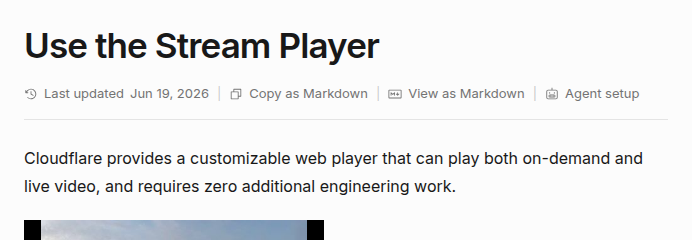
The built-in player is the part a marketer will look at first. Cloudflare describes it as a customizable web player that plays both on-demand and live video and needs zero extra engineering, embedded with a single iframe. It handles adaptive quality switching, captions and thumbnails out of the box, and you can drop in your own player against the HLS or DASH manifests if you would rather. Signed URLs and token authentication keep videos from being hotlinked or shared beyond the pages you control.
That is a competent delivery player. What it is not is a conversion player, and that gap matters more than any single control, so it gets its own section below.
What it costs
Stream's pricing is close to its headline feature, and it is refreshingly blunt. There are no plans, no seats and no feature tiers. You pay on two dimensions only.
Encoding
Free
Built-in player
Free, included
Ingress and bandwidth
Free, no egress fees
Storage
$5 / 1,000 minutes stored / month
Delivery
$1 / 1,000 minutes delivered
Monthly minimum
$5 (one storage block)
Free trial
None for Stream
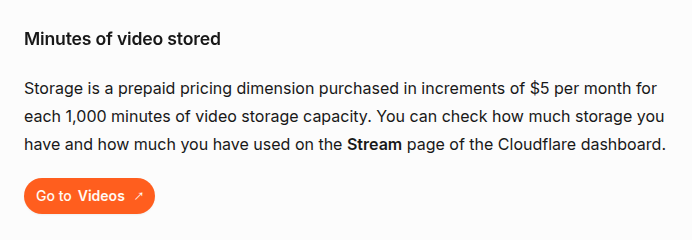
Storage is prepaid in $5 increments, one increment buying 1,000 minutes of storage capacity per month. Delivery is post-paid at $1 per 1,000 minutes actually watched. Encoding, adaptive-bitrate packaging, ingress and bandwidth are all included, so there are none of the surprise egress fees that make general clouds hard to forecast. Cloudflare's own worked example: two people each watch thirty minutes of a video, that is sixty minutes delivered, and it costs six cents.
The minimum spend is one $5 storage block, so there is no free Stream tier despite the free Cloudflare account. For most VSL libraries the bill will be small, because you are charged on minutes watched rather than gigabytes served, which can make a long, high-resolution sales video cheaper to deliver here than on a per-gigabyte host. Model it against your own watch time before assuming, the same as with any usage-priced host.
The part that decides it for a VSL
Here is where a sales-video buyer has to stop. Cloudflare Stream delivers and plays the video beautifully, and then it stops. It has no sound-first autoplay that restarts on unmute, no timed in-video CTA or lead gate, no split testing decided on sales, and no way to post a cart-verified conversion back to Meta, TikTok or GA4. Its analytics are delivery metrics. One reviewer, LiveAPI, found them "missing key indicators such as drop-off points, heatmaps, per-viewer breakdowns, completion rates, latency metrics and usage analytics". Those are exactly the numbers a direct-response marketer lives on.
None of that is a flaw, because Stream never claims to be a VSL player. But it means the entire conversion and attribution layer that a purpose-built host gives you out of the box is yours to assemble, using Stream's API and your own analytics stack. If you have a developer, that is fine: you own the pipeline and the bill is tiny. If you do not, it is the single reason Cloudflare Stream is the wrong first host for a sales video.
Stream delivers and plays the video. The conversion and attribution layer a VSL needs is a separate box you build over its API.
Content protection stops at signed URLs
Protection is real but basic. You get signed URLs and token authentication, which stop casual hotlinking and lock playback to pages you control. What you do not get is studio-grade DRM. Reviewers note the absence of Widevine and FairPlay support and of dynamic, per-viewer watermarking, the features a course seller worried about piracy will find on dedicated hosts. For a VSL on a landing page that usually matters less than it does for a paid course, but it is worth knowing where the ceiling is before you commit.
The bill risk nobody puts on the box
Delivery is post-paid and, like the rest of Cloudflare, there is no hard spending cap. A traffic spike, a video that gets scraped, or a public URL passed around runs up delivery charges with nothing to stop it. Cloudflare offers budget alerts, but those only email you once a threshold is crossed. They do not pause or limit usage. Users have filed feature requests asking Cloudflare to add a real cap, one of them titled "Add a monthly spending cap feature to prevent unexpected charges". On cold paid traffic, where volume is the entire point, that is a risk to price in rather than wave off.
What long-term users report
The praise is consistent, and it is about price and reach. A 2026 scored review rated Stream 7.6 out of 10 and called it "reliable video hosting at competitive per-minute pricing with free encoding". Another put it plainly against its best-known rival: "Stream wins on price simplicity; Mux wins on advanced features." If your need is simple, global, cheap delivery, that is the whole case for it in two sentences.
The criticism is just as consistent, and it clusters in two places. Support is the first: on anything below an enterprise contract, help is slow, and a Hacker News thread titled "Ask HN: Has anyone been able to contact Cloudflare Support in the last 5 days?" captures the mood of users left waiting on open tickets. Live-stream reliability is the second: Cloudflare's own community forum carries recurring reports like "Video not found for live stream", where an input connects but the player will not play, with thin documentation to self-diagnose. Most users never hit either. When they do, the failure mode is a video that will not load or a bill that will not stop, so both belong in the decision rather than the footnotes.
Who should buy it, and who should not
Buy Cloudflare Stream if you are technical, you want cheap and predictable per-minute delivery on a network that will not fall over under load, and you are happy to build the conversion and attribution layer yourself, or if your video's job is to sit inside an app, a course or a help centre rather than to sell to cold traffic. Skip it if you are a non-technical offer owner who needs a player that autoplays with sound, gates the view, split-tests on sales and attributes the purchase on day one. For that, a purpose-built VSL host costs more each month and saves you a build you may not want to own.
Changelog
4 October 2026: First published. Pricing, player and pipeline facts read from cloudflare.com and the Stream docs and checked against the vendor's own pages. User sentiment drawn from third-party reviews, Cloudflare's community forum and Hacker News.
What works
Dead-simple, predictable pricing. You pay on two dimensions only, $5 per 1,000 minutes stored and $1 per 1,000 minutes delivered, with encoding, adaptive-bitrate packaging and bandwidth included and no separate egress fees. Reviewers single out the value.
Runs on Cloudflare's own global network, the same infrastructure the company says sits in front of about a fifth of the web, so delivery is fast and holds up under load. One API covers upload, encoding, storage, delivery and live RTMP or SRT ingest.
A capable built-in player and sensible access control. Adaptive quality switching, captions and thumbnails work out of the box, you can swap in your own player against the HLS or DASH manifests, and signed URLs plus token authentication stop casual hotlinking.
What to watch
It has no VSL conversion layer. There is no sound-first autoplay that restarts on unmute, no timed in-video CTAs or lead capture, no split testing on sales, and no cart-verified sale attribution, so everything that makes a sales video convert is yours to build over Stream's API.
Analytics are thin and there is no studio-grade DRM. The dashboard reports delivery, not drop-off points, heatmaps or per-viewer completion, and protection stops at signed URLs, with no Widevine or FairPlay support and no dynamic watermarking.
No hard spending cap, and support is slow below enterprise. Post-paid delivery can run up an uncapped bill on a traffic spike or a leaked URL, budget alerts only notify after the fact, and users report long waits on support tickets. The failure mode when it goes wrong is a video that will not load or a bill that will not stop.
How Cloudflare Stream compares
Cloudflare Stream is delivery infrastructure, so its real peers are the other developer-grade hosts, not the dedicated conversion players. Its nearest match is Bunny Stream, the other usage-priced delivery platform that leaves the conversion layer to you, though Bunny bills per gigabyte and adds in-player content protection and a retention graph Cloudflare does not. Vimeo is the closest general host on job, easier for a non-developer but far pricier. Adilo adds an in-video marketing layer Cloudflare leaves you to build, and Wistia is the more polished, better-supported platform if your video's job is B2B content rather than cold-traffic selling. If you need the conversion and attribution layer out of the box, our Cloudflare Stream alternatives rank every option on what selling to paid traffic actually needs, and the full ranking of video hosting for VSLs and the head-to-head comparisons are there if you are choosing from scratch.
Built-in Stream player.
Cloudflare's docs section for the Stream Player, describing a customizable web player that plays both on-demand and live video with zero additional engineering, above the start of the embedded player.
Screenshot: developers.cloudflare.com, Two-dimension usage pricing.
Cloudflare's Stream pricing docs explaining the storage dimension: storage is prepaid in increments of $5 per month for each 1,000 minutes of video storage capacity.
Screenshot: developers.cloudflare.com,
What users actually say about Cloudflare Stream
Research: unverified
Cheap, predictable, all included delivery↑ frequently praised
Reviewers agree Stream's two-line pricing (minutes stored plus minutes delivered, with encoding, packaging and bandwidth included) is simple and cost-effective for a global audience, and that the Cloudflare network delivers reliably at scale.
“reliable video hosting at competitive per-minute pricing with free encoding”
Thin analytics and no conversion layer↓ common complaint
Third-party reviewers flag that Stream's analytics lack drop-off points, heatmaps, per-viewer breakdowns and completion rates. It wins on price simplicity but not on advanced marketing features, which is a problem for anyone judging a video on how it sells.
“missing key indicators such as drop-off points, heatmaps, per-viewer breakdowns, completion rates, latency metrics and usage analytics”
Protection is limited to signed URLs and token access; reviewers note the absence of Widevine/FairPlay DRM and dynamic watermarking that paid hosts offer.
No hard spending cap means bill risk↓ common complaint
Delivery is post-paid with no built-in spending cap, and users have filed feature requests asking Cloudflare to add one to prevent unexpected charges from traffic spikes or leaked URLs.
“Add a monthly spending cap feature to prevent unexpected charges”
Support and live stream reliability edge cases↓ common complaint
Users report weeks-long waits on support tickets and recurring 'Video not found' errors where a live input connects but the player fails to play, with thin documentation to self-diagnose.
“Ask HN: Has anyone been able to contact Cloudflare Support in the last 5 days?”
Cloudflare Stream starts at $5/mo minimum. It bills on a Usage-based model. Prices last checked September 2026.
Does Cloudflare Stream have a free plan?
No free tier; billing starts at one $5 storage block.
Who is Cloudflare Stream best for?
Cloudflare Stream is the pick if you have a developer and want cheap, predictable, global video delivery on a network that will not buckle under load, and you are ready to build the VSL conversion layer yourself. It is not a sales-video player out of the box.
Mara edits the reviews and roundups on VSL Host Report. She looks at how a video player behaves on cold paid traffic: autoplay and unmute behaviour, per-second retention, timed CTAs, lead gates and load speed. She also maps what each host really costs, whether it bills per play, per gigabyte or per seat, and rebuilds the monthly bill for a typical VSL funnel. For each piece she reads long-term user reports across forums and review sites, works through the vendor's own docs and pricing, and confirms the numbers before a verdict goes live.