Support and onboarding ↑ frequently praised
Capterra reviewers praise the support team and describe the product as easy to set up without deep technical skills.
“Customer service is awesome.”
“It's super easy to use”
Video hosting review
SproutVideo is the pick if you need private business or training video locked to your own sites and named viewers, with CTAs and lead capture built in, and you do not need the host to tie a play to a sale.
Quick answer
SproutVideo is a real, long-running host: it has operated since 2010 and lets you try every feature for 30 days without a card. It fits private business video such as client updates, staff training and gated demos, with logins, watermarks and lead forms. Two things cause regret. Bandwidth past the plan allowance is billed per gigabyte, and the player cannot tell your ad platform which play became a sale.
SproutVideo keeps turning up on shortlists next to Wistia and Vimeo, and the name is less familiar than either. Before you move a training library or a client portal onto it, you want to know whether the company is solid and what you will wish you had known before the first invoice.
The company has been in business since 2010, going by the copyright line on its homepage. That page describes live and on-demand video hosting for businesses, with tools for secure sharing, marketing, player branding and viewer analytics. It also displays customer logos such as Amazon, Siemens and FedEx, put there by the vendor. A 30-day trial of every feature asks for no credit card.
This review is built from SproutVideo's homepage, pricing page, features page and bandwidth help article, plus user reviews on G2, Capterra and Trustpilot. We did not run it on a live campaign, and how we evaluate hosts explains the method.
For this site's readers the verdict splits in two. SproutVideo is a careful host for video that has to stay private, with a marketing layer on top. As the main host for a cold-traffic VSL measured in orders it is weak, and its bandwidth meter is where most regret stories start.
Access control is the core of the product. The features page lists password protection, a domain whitelist so embeds play only on your own sites, and two-factor authentication on the account. Viewer login, which makes each person sign in before watching, starts on the Sprout plan.
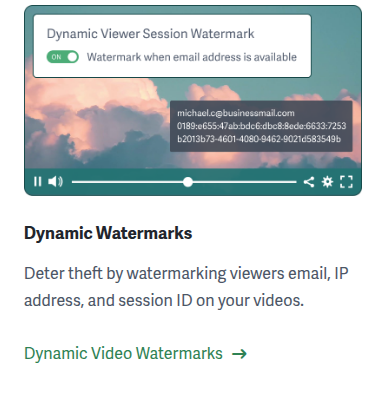
From Tree up you get dynamic watermarks that stamp the viewer's email, IP address and session ID over the picture, plus signed embed codes that stop someone reusing your embed on another page. Forest adds viewer single sign-on, playback limited by country or IP address, exportable reports and phone support.
Delivery uses AES-128 encryption, which protects the stream in transit. Studio DRM such as Widevine or FairPlay is a separate layer that SproutVideo does not offer. For a client update or internal training, a login plus a watermark naming the viewer is usually deterrent enough. If you sell a course and pirated lessons cost you money, the VdoCipher review covers a host with DRM on all its plans.
Most buyers weighing SproutVideo have Wistia open in the next tab, and the entry prices sit far apart. Seed is $12 a month on annual billing. Wistia's Business plan, the tier our Wistia review covers, starts at $79 a month with 1 TB of bandwidth.
SproutVideo gives finer control over who watches, with viewer login, watermarks that name the viewer, and domain, IP and country rules. Wistia is built around content marketing, and attribution there runs through its Signals add-on. Even so, one critical reviewer on G2's SproutVideo vs Wistia page felt SproutVideo could be cheaper, writing that “there are competing solutions for lower cost available”.
Neither host tells Meta or Google which play became a sale, so for a VSL bought on orders both belong lower on the list. If your final two are the big general hosts, Wistia vs Vimeo settles that matchup and the Vimeo review covers the rest.
The marketing tools come with Seed. The marketing section lists in-player calls to action, lead capture forms, post-play screens that point viewers to another page, and integrations with HubSpot, Mailchimp and Zapier. That covers gating a product demo behind an email form and passing the lead straight to your list.
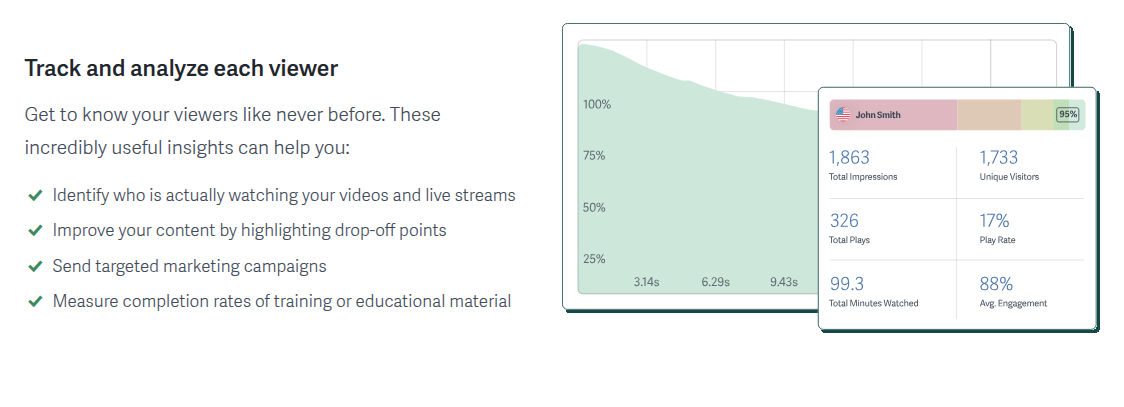
The analytics include engagement heatmaps, a record of what each identified viewer watched, and CSV export. You can see where a demo loses people and which named prospect finished it. Video landing pages and simple video sites are included, which suits a gated webinar replay.
A sales video on paid traffic asks for more. Nothing on SproutVideo's pages describes sound-first autoplay that restarts when a viewer unmutes, split tests judged on sales, or cart-verified conversions sent back to the ad platforms. If you buy media on those signals, the Vidalytics review covers a player built for direct response, and our ranking of video hosts for VSLs places the rest.

Capterra reviewers praise the support team and describe the product as easy to set up without deep technical skills.
“Customer service is awesome.”
“It's super easy to use”
A Capterra reviewer found the included bandwidth tight and weighed switching hosts over overage fees. SproutVideo's own FAQ says its optional usage cap cannot guarantee zero extra charges during very fast streaming.
“No enough broadband allowed for sprout users, if we exceed any more may switch to a different platform, I don't want to pay $40 more just for bandwidth.”
“We do our best to disable streaming at your set limit, however, we cannot guarantee your account will not incur additional usage charges.”
G2's highlighted critical review on the SproutVideo vs Wistia page says cheaper competing hosts exist.
“Cost - there are competing solutions for lower cost available.”
A small set of sharply negative Trustpilot reviews describes billing credits being refused after contacting support. The sample is thin and sits against the support praise on Capterra.
“I chatted with someone and was denied a credit”
“Cost - there are competing solutions for lower cost available.”
“No enough broadband allowed for sprout users, if we exceed any more may switch to a different platform, I don't want to pay $40 more just for bandwidth.”
“Customer service is awesome.”
“It's super easy to use”
“I chatted with someone and was denied a credit”
“We do our best to disable streaming at your set limit, however, we cannot guarantee your account will not incur additional usage charges.”
The praise is mostly about people and setup. On Capterra, one reviewer wrote that “Customer service is awesome” (review page 6), and another said “It's super easy to use” (page 7).
The criticism is about money. A Capterra reviewer on the Sprout plan complained of “No enough broadband allowed for sprout users” and said they might switch rather than “pay $40 more just for bandwidth”. On Trustpilot, a few reviews describe billing disputes, one saying “I chatted with someone and was denied a credit”. That set is small and sharply negative, and it sits beside steady support praise on Capterra.
I'd judge SproutVideo by who is allowed to watch. For a client portal, demos sent to named prospects or staff training, it covers access control at an entry price Wistia does not match, and I would start the trial with the bandwidth cap switched on. For a long VSL on cold traffic, I'd host the video on a conversion player and keep SproutVideo for the private library.
SproutVideo sells four plans, each cheaper on annual billing. The pricing page sets out storage and bandwidth as below, with bandwidth stated per year on annual plans.
| Plan | Annual | Monthly | Storage | Bandwidth a year |
|---|---|---|---|---|
| Seed | $12/mo | $15/mo | 150 GB | 1,800 GB |
| Sprout | $35/mo | $45/mo | 400 GB | 4,800 GB |
| Tree | $72/mo | $95/mo | 1 TB | 12 TB |
| Forest | $195/mo | $295/mo | 2 TB | 24 TB |
Go past the allowance and the video keeps streaming while SproutVideo bills the extra. Each additional gigabyte costs $0.25 on Seed, and the rate drops on each higher plan to $0.06 on Forest. The pricing page puts it as “There are no usage caps.” A page that must never go dark will like that, and a tight budget will not. An optional cap exists, but the bandwidth FAQ warns that SproutVideo “cannot guarantee your account will not incur additional usage charges” when streaming is very fast.
On a sales video the meter matters quickly. At this site's assumed stream of about 0.025 GB a minute, a 20-minute video that 5,000 visitors watch for a quarter of its length delivers roughly 625 GB a month. Seed covers about 150 GB of that, so the rest adds about $119 to the fee, while Tree's allowance of about 1,000 GB a month takes the same video for $72. The SproutVideo pricing breakdown works through a heavy month as well, and the VSL hosting cost calculator prices the same video on hosts that meter differently.
6 discussions and reviews read for this page. Quotes are excerpts; open a link to read the original in context.
Related reading

Written by
Mara Vance
Editor
Mara edits the reviews and roundups on VSL Host Report. She looks at how a video player behaves on cold paid traffic: autoplay and unmute behaviour, per-second retention, timed CTAs, lead gates and load speed. She also maps what each host really costs, whether it bills per play, per gigabyte or per seat, and rebuilds the monthly bill for a typical VSL funnel. For each piece she reads long-term user reports across forums and review sites, works through the vendor's own docs and pricing, and confirms the numbers before a verdict goes live.
Last checked 2026-10-14