You have heard of Presto Player, probably in a WordPress funnel group or beside a Bunny Stream recommendation. The buying question is whether it is maintained, dependable and complete enough for a sales page. It is a real, established plugin with more than 100,000 active WordPress.org installations and a 4.8 out of 5 directory rating when this review was researched.
The catch is scope. Presto Player is the player and conversion-control layer inside WordPress. It does not store or deliver the video file. Your final setup pairs the plugin with Bunny Stream, Vimeo, YouTube, a self-hosted file or another public video URL, so the license is only one part of the cost.
Our verdict comes from Presto Player’s current site and pricing pages, its WordPress.org listing, support threads and a long-term WordPress discussion. We did not run it on a live campaign. The research method explains how the desk checks vendor claims and weighs user reports.
Is Presto Player legitimate and maintained?
The independent signals are substantial for a WordPress plugin. The plugin directory lists more than 100,000 active installations. It also showed a 4.8 out of 5 average across hundreds of reviews at the research date. A recent reviewer wrote that the team “takes bug reports seriously,” which supports the view that buyers are dealing with an active product and support operation.
That evidence does not erase the performance complaints. WordPress.org support threads include users who blamed version 3 for sharp PageSpeed drops and removed it from production. Another user reported that slow player loads cleared after changing the performance preset to Page Load Speed (Extreme). The practical read is that the plugin is established, while its loading mode still deserves attention on the page where you buy traffic.
What Presto Player actually replaces
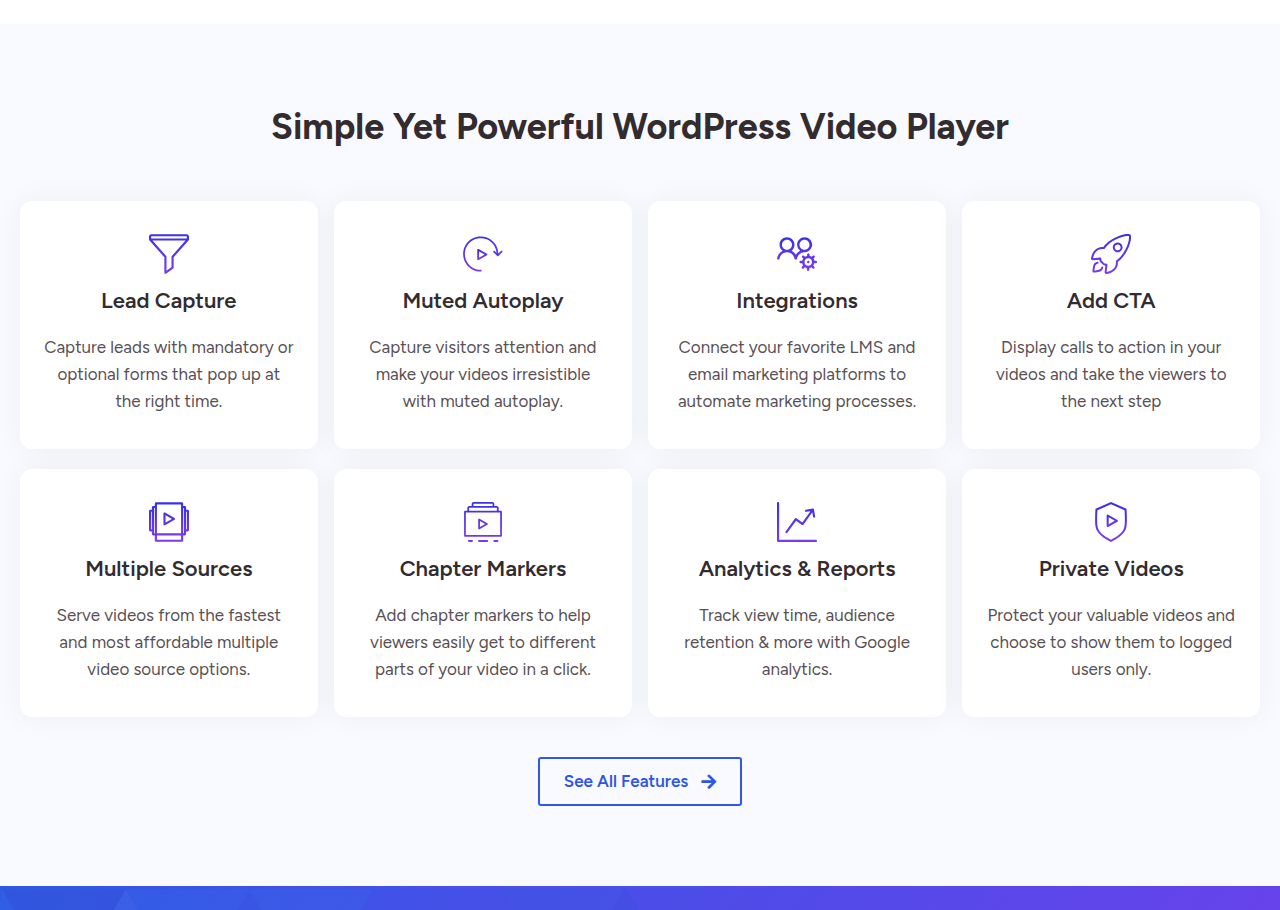
Presto replaces the generic WordPress embed with a branded player and marketing controls. It can show calls to action, collect an email before or during viewing, stick the video as a visitor scrolls and divide a long recording into chapters. Paid plans add muted autoplay, custom presets, the analytics dashboard, CRM connections, Bunny.net integration and private-video controls according to the vendor’s plan table.
It leaves hosting to another service. For a WordPress owner, that split creates flexibility because the same player can sit over several sources. It also creates a second support boundary. A documented LearnDash and Bunny case showed only a blank player until the stack was debugged. Another WordPress operator described the Presto and Bunny combination as “rock solid.” Both can be true because the player, LMS and host remain separate moving parts.
The WordPress VSL player controls that matter
A WordPress VSL player earns its place through what happens around the video. Presto’s muted autoplay can start movement without forcing sound on page load. This is different from the sound-first unmute behavior sold by some direct-response platforms, so a cold-traffic buyer should judge whether a muted opening preserves the hook.
Calls to action and email capture live in the player
Presto can display a call to action and can make email capture optional or mandatory before the viewer continues. That gives a WordPress funnel owner a conversion step without placing a separate form beside the embed. The feature is useful for webinar-style lead capture, gated lessons and long sales videos where the button should appear after the pitch.
Analytics answer retention questions, not revenue questions
The dashboard covers view time and audience retention, while paid plans list Google Analytics integration. Those reports can show whether viewers stay through the hook or leave before the offer. The data does not connect the viewing session to a cart-verified sale, score an experiment on revenue or send a server-side purchase back to an ad platform.
That boundary is decisive for paid traffic. If the question is whether viewers watched, Presto has an answer. If the question is which viewing pattern produced the sale, you need a separate attribution build or a dedicated platform. Our Vidalytics review covers one all-in-one VSL alternative. The Voomly review and Wistia review show how a creation suite and a B2B host solve different jobs.
Private video controls suit courses and memberships
Private videos can require a logged-in WordPress user, use expiring links and add a watermark tied to that account. LearnDash video progression is also listed among the integrations. Those controls make Presto relevant to a course site, although the video file still lives with the chosen backend.
Bunny Stream is the common low-cost backend for this stack, and its pricing page explains the bandwidth bill. Vimeo is easier to recognize and carries a broader creation and hosting product. Sellers leaving a free embed can also read why sales pages move away from YouTube.
What WordPress users say after installation
The strongest positive evidence is support and stack stability. A recent WordPress.org reviewer described Presto as a “Solid product” and said the team clearly takes bug reports seriously. In a separate WordPress discussion, an operator called the Presto Player and Bunny Stream combination “rock solid” for member video.
The most serious criticism is page performance. A support-thread author wrote, “At this point Presto Player is not useable,” after version 3 hurt PageSpeed on production sites. A different user found a workable setting change and reported, “Solved it by setting all the video players performance settings to Page Load Speed (Extreme).” These reports point to a setup risk worth testing on the actual sales-page template before sending paid traffic.
The other recurring issue comes from the split stack. A LearnDash support thread reported Bunny videos showing only a blank space. This does not establish one universal cause, but it shows the troubleshooting path can cross the LMS, player plugin and video host.
Presto Player pricing: plugin plus hosting
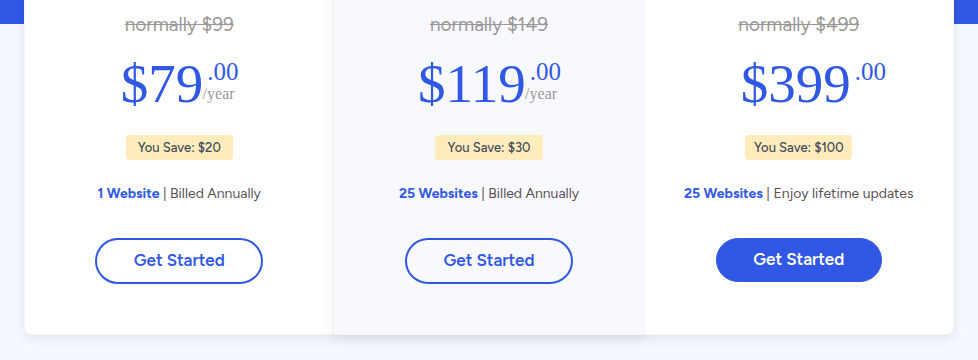
Presto Player pricing starts with a free plugin on WordPress.org. The paid Starter license is $79 per year for one website at the introductory price. Pro is $119 per year for 25 websites. The Lifetime license is $399 for 25 websites with lifetime updates, and the pricing page also lists three payments of $139.
| Option | Price | Sites | What the payment covers |
|---|
| Free | $0 | WordPress install | The free plugin with a smaller feature set |
| Starter | $79/year | 1 | Annual plugin license and paid features |
| Pro | $119/year | 25 | Annual license for a larger WordPress portfolio |
| Lifetime | $399 | 25 | Lifetime updates for the licensed sites |
The annual numbers are introductory. The vendor says Starter normally costs $99 and Pro normally costs $149, and renewals are charged at the full price. The Lifetime option is shown as normally $499. Paid plans have a 14-day money-back guarantee. There is no separate time-limited trial beyond the free plugin and that refund window.
The host or CDN is a second bill
None of these prices includes video storage or delivery. A Bunny Stream setup adds storage and bandwidth charges. A Vimeo setup adds the relevant Vimeo plan. The right comparison is therefore the annual plugin fee plus the backend cost, measured against an all-in-one host that bundles player, delivery and analytics.
For a single WordPress sales site, Starter is the natural paid tier. Pro becomes easier to justify for an agency, publisher or course business managing several domains. Lifetime avoids annual renewal, although it still does not remove the separate hosting bill.