Skip to content
Menu

Video hosting review

Vidyard review: B2B sales video

Vidyard is the pick if you run a B2B sales or customer success team that sends short personal videos to prospects and wants to see who watched, inside the tools your reps already use.

By Mara Vance, reviewed by the VSL Host Report desk. Updated October 2026. Prices verified with the vendor.

Quick answer

Yes, Vidyard is real, established software, around since 2011. Buy it if your reps record personal clips for prospects and you want view alerts and watch data. Skip it for a landing-page VSL on paid traffic: it recommends muted autoplay, cannot tie a view to a purchase, and its CRM sync and custom calls to action start on the quote-only Teams plan.

You heard the name from a sales team, or it came up in search results for “sales video” next to the VSL hosts this site covers. The question behind that search is whether Vidyard is real software that earns its seat price, and whether it does the job you have in mind.

It is real. Vidyard has been selling video software since 2011 and describes itself as video for revenue teams that is “personal, trackable, and embedded in your tools.” Our verdict comes from Vidyard's own homepage, pricing, hosting, sales and support pages, plus long-term user reports on G2 and Reddit. We did not run Vidyard in a live sales sequence or campaign, and our methodology page explains how we research instead.

A Vidyard sales video and a VSL are two different jobs

“Sales video” covers two jobs that need different software. In the first, a rep records a minute or so for one prospect, drops it into an email or a LinkedIn message, and wants an alert when it gets watched. In the second, one long video sits on a landing page in front of cold paid traffic and does the selling by itself: it has to hold attention with sound, show a buy button on cue and report the sale back to the ad pixel.

Vidyard is built for the first job, and for hosting the marketing video around it. Its own landing-page guide calls not autoplaying “a landing page video best practice,” and its support docs recommend pairing autoplay with mute by default because browsers block sound. Conversion players for VSLs are designed around getting the visitor to unmute and restarting the video when they do. If that second job is yours, the Vidalytics review, the Voomly review and our ranking of the best video hosts for VSLs are the better starting points.

What Vidyard includes

Four product lines share one account. Video Messages is the recorder, as a browser extension and a desktop app, for personal clips with view notifications. Hosting is an ad-free embeddable player with chapters, in-video calls to action, up to 4K playback and analytics. Video Hubs gather videos onto a branded page, from the Teams plan up. Video Agent and AI avatars automate personalised follow-up when a buyer does something, sold as an add-on.

The sales page shows where those clips travel: LinkedIn, Salesloft, Outreach and the CRMs. The pricing table is where the catch sits. CRM and marketing-automation data integrations begin on Teams, with two on Teams and unlimited on Enterprise, and Starter has none. If watch data in HubSpot or Salesforce is the reason you are buying, budget for a sales call.

Vidyard against Wistia

Its nearest peer on this site is Wistia. Vidyard's comparison page casts Wistia as the tool for marketing-only libraries and pitches itself as the one that adds record-and-send outreach and wider go-to-market integrations. It also claims no library or bandwidth caps against Wistia's bandwidth limits. Those are the vendor's own claims, and they are about B2B content work. Neither tool sets out to be a paid-traffic sales player, which is the gap Vidalytics vs Wistia lays out.

Who should buy it, and who should skip it

Vidyard earns its seats with three kinds of team:

  • SaaS and B2B sales teams sending short personal clips, especially follow-ups after a call or a reply, where reps on Reddit say video lands best.
  • Customer success teams recording onboarding walkthroughs for one account at a time.
  • Marketing teams that want hosting with viewing data in the CRM and can pay for a Teams quote.

Skip it if your video runs on Meta or TikTok ads to a funnel page and you need sound-first autoplay, timed buy buttons, split tests judged on sales, or the cart-verified sale posted back to the ad platform. Skip it too if you only want to move one sales video off YouTube, a case our page on why sellers leave YouTube embeds covers host by host.

Left, a small video bubble on an envelope with a line to an eye symbol. Right, a large muted video player on a page, with a dashed line down to a shopping cart.
Vidyard is built for the clip on the left: a personal video in an inbox and an alert when it is watched. The muted landing-page video tied to a cart on the right is a different job.

What works

  • Reps can record a personal clip from the browser extension or the desktop app and send it in minutes. G2 reviewers single out how much faster that is than typing the same explanation.
  • Starter adds an ad-free hosted player with chapters, in-video calls to action, playback up to 4K and viewing analytics, so marketing video can live on the same account as rep outreach.
  • The free plan needs no card and covers five recorded videos a month at up to 30 minutes each, which is enough for one rep to try the outreach workflow.
  • Vidyard says its hosting has no library size or bandwidth caps and sets that against Wistia's bandwidth limits, so a growing library does not change the bill by itself.
  • Video Agent sends personalised follow-up automatically when a buyer takes an action. On Starter it costs $24 or $29 per seat per month as an add-on, the lower figure on annual billing.

What to watch

  • CRM and marketing-automation sync, fully customisable calls to action, Video Hubs and domain playback restrictions all start on Teams, which has no public price. A Starter seat records and hosts but sends nothing to HubSpot or Salesforce.
  • Every rep is a seat at $59 a month on annual Starter, so the bill grows with headcount. A third-party roundup quotes one reviewer saying the model “punishes you for scaling.”
  • There is no VSL conversion layer: no sound-first autoplay, no split tests that pick a winner by sales and no cart-verified attribution. That limit bites only when a video has to sell to cold ad traffic on its own.
  • Users on r/sales report the browser extension cutting recordings short or failing to record. The desktop app is the workaround other commenters suggest.
  • Corporate firewalls block playback for some prospects. One SDR team blamed that for a pilot with poor returns, which matters most when you sell into large, locked-down companies.

Calls to action, autoplay and analytics by plan

Three controls decide how far a Vidyard video can push a viewer, and two of them change with the plan you buy.

Calls to action. Starter includes basic in-video calls to action, the kind a rep adds at the end of a clip to book a meeting. Fully customisable calls to action are listed as not included on Free or Starter and begin on Teams.

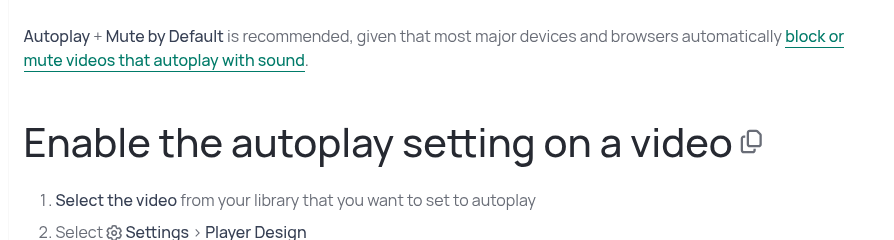
Autoplay. You switch it on in the player settings or by adding autoplay=1 to the video link. Vidyard's help centre recommends “Autoplay + Mute by Default” because most browsers block or mute video that starts with sound. For a rep's clip that is sensible. For a long sales video on cold traffic it means the video starts silent and nothing in the product is built to win the unmute.

Analytics. Paid plans include viewing analytics alongside the view notifications reps use to time a follow-up. Sending those views into the CRM or marketing automation starts on Teams. None of the tiers reports a purchase, so revenue still has to be matched to viewers in your own CRM.

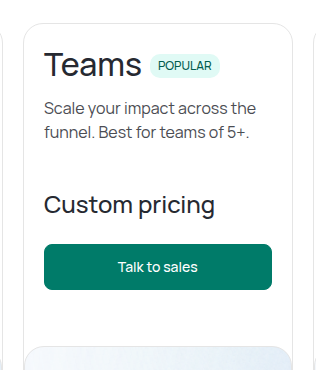
Vidyard's pricing page card for the Teams plan, marked popular and best for teams of five or more, showing custom pricing and a Talk to sales button.
Plan tiers and per-seat pricing. Vidyard's pricing page card for the Teams plan, marked popular and best for teams of five or more, showing custom pricing and a Talk to sales button. Screenshot: vidyard.com,
Vidyard help article stating that Autoplay plus Mute by Default is recommended because most devices and browsers block or mute videos that autoplay with sound, above the steps to enable autoplay.
Autoplay with mute by default. Vidyard help article stating that Autoplay plus Mute by Default is recommended because most devices and browsers block or mute videos that autoplay with sound, above the steps to enable autoplay. Screenshot: knowledge.vidyard.com,

What users actually say about Vidyard

Research: unverified

Knowing who watched is the reason teams keep it ↑ frequently praised

Reviewers value the per-viewer analytics: who opened a video and how long they watched. That signal is what the vendor sells as trackable video for revenue teams.

“Vidyard helps revenue teams scale trust at every stage of the customer journey with AI-powered video that's personal, trackable, and embedded in your tools.”

Anonymous Blog: Vidyard homepage (vendor)

“We have seen good response and love the analytics showing who watched what and for how long.”

Anonymous Capterra: Vidyard reviews on Capterra

Cold email video does not always get played ↓ common complaint

Sales ops users report that many buyers block external images and do not play videos in cold email, so the recording only pays off where the prospect already engages.

“Most buyers have started to block external images, don't play the videos now.”

Anonymous Reddit: Loom, Vidyard, other? (r/SalesOperations)

The Chrome extension is the weak link ↓ common complaint

TrustRadius reviewers say the Chrome add-in sometimes fails, which matters because reps record and insert videos from the browser.

“The add-in for Chrome sometimes doesn't work.”

Anonymous Blog: Vidyard reviews on TrustRadius

Per seat price and CRM sync gated to Teams ↓ common complaint

Vidyard licenses per seat, and its own pricing table shows CRM and marketing-automation data integrations only from Teams up. Some sales ops users call it overpriced and point to Loom for internal and support video.

“We keep it simple with straightforward per-seat licensing and a commitment to transparency.”

Anonymous Blog: Vidyard pricing (vendor)

“Data Integrations | No | No | 2 | Unlimited”

Anonymous Blog: Vidyard pricing, plain text (vendor)

“Stay away from vidyard. It's way overpriced”

Anonymous Reddit: Loom v Vidyard help needed (r/SalesOperations)

“For internal video sharing, or customer support walkthroughs loom is probably the best right now”

Anonymous Reddit: Loom, Vidyard, other? (r/SalesOperations)

“Vidyard helps revenue teams scale trust at every stage of the customer journey with AI-powered video that's personal, trackable, and embedded in your tools.”

Anonymous Blog: Vidyard homepage (vendor)

“We keep it simple with straightforward per-seat licensing and a commitment to transparency.”

Anonymous Blog: Vidyard pricing (vendor)

“Data Integrations | No | No | 2 | Unlimited”

Anonymous Blog: Vidyard pricing, plain text (vendor)

“We have seen good response and love the analytics showing who watched what and for how long.”

Anonymous Capterra: Vidyard reviews on Capterra

“The add-in for Chrome sometimes doesn't work.”

Anonymous Blog: Vidyard reviews on TrustRadius

“Most buyers have started to block external images, don't play the videos now.”

Anonymous Reddit: Loom, Vidyard, other? (r/SalesOperations)

“Stay away from vidyard. It's way overpriced”

Anonymous Reddit: Loom v Vidyard help needed (r/SalesOperations)

“For internal video sharing, or customer support walkthroughs loom is probably the best right now”

Anonymous Reddit: Loom, Vidyard, other? (r/SalesOperations)

What third-party users say

The praise is about speed. A G2 reviewer wrote that they can “quickly send a video to a coworker or client and communicate in 2 minutes what I’d otherwise have to type out that would take me five times as long.” On r/sales, a rep who asked how to use it in a BDR role got a short reply: “Vidyard is best for follow ups.”

The criticism is about reliability and reach. A paid user in an r/sales thread on alternatives liked the end-of-video call to action and then wrote, “BUT it’s so glitchy. Cuts off recording early, won’t record when going through extension.” In a different thread an SDR described a pilot where “the return was pretty poor,” because many prospects sat “behind strong firewalls that block the videos.” Most of the Reddit reports date from 2021 and 2022, so use the trial to see whether the recording problems still happen on your machines.

Vidyard pricing and plan tiers

Vidyard pricing is per seat. Only Free and Starter carry published prices. Teams and Enterprise are quoted by the sales team, so the table leaves those cells as custom.

PlanPer seat per monthWhat it addsWho it fits
Free$0Recorder, 5 videos a month up to 30 minutes, no hostingOne rep trying video outreach
Starter$59 annual, $89 monthlyHosting, basic calls to action, viewing analytics, 14-day trialIndividual sellers and small teams
TeamsCustomTwo CRM or marketing integrations, custom calls to action, Video Hubs, domain restrictionsSales teams that need CRM sync
EnterpriseCustomUnlimited integrations, API access, SSOLarge revenue organisations
Video Agent$24 annual, $29 monthlyAdd-on with unlimited AI video automationTeams automating follow-up

Seat count is what moves the bill. Ten reps on annual Starter come to $590 a month, or $7,080 a year, before any Video Agent seats. The same ten on monthly billing pay $890 a month. Watching does not change the price, since Vidyard says it puts no bandwidth cap on hosting.

The trap is buying Starter for the CRM link. Starter's feature table lists data integrations as not included, so a team that needs viewing data in Salesforce or HubSpot is buying Teams at whatever the quote comes to. The full breakdown sits on the Vidyard pricing page.

Changes to this review

  • 12 October 2026: First published. Plans, prices, the Teams gate on CRM sync and the autoplay guidance were read on Vidyard's pricing, hosting, sales and help pages. User reports were added from G2, Reddit and a third-party roundup.

Frequently asked questions

Is Vidyard legit?
Yes. It has sold video software to sales and marketing teams since 2011 and carries years of public reviews on G2 and Reddit.
Is Vidyard free?
There is a free plan with no card. It records five videos a month but does not host video, which takes Starter.
Does Vidyard Starter sync with HubSpot or Salesforce?
No. Data integrations appear first on the Teams plan, which is priced by quote.
How much do ten Vidyard seats cost?
On annual Starter, $7,080 a year. Month to month it is $890 a month. Teams pricing comes from sales.
Can I host a VSL on Vidyard?
It will play one, but it is set up for muted autoplay and tracks views rather than purchases. A dedicated VSL player suits cold ad traffic better.
Should I pick Vidyard or Wistia?
Pick Vidyard when reps send personal video to prospects. Pick Wistia when the work is a marketing video library.

Sources

From Vidyard

Other sources

8 discussions and reviews read for this page. Quotes are excerpts; open a link to read the original in context.

  1. [vy-home] Vidyard homepage (vendor) Blog,
  2. [vy-per-seat] Vidyard pricing (vendor) Blog,
  3. [vy-teams-crm] Vidyard pricing, plain text (vendor) Blog,
  4. [cap-analytics] Vidyard reviews on Capterra Capterra,
  5. [tr-chrome] Vidyard reviews on TrustRadius Blog,
  6. [rd-blocked] Loom, Vidyard, other? (r/SalesOperations) Reddit,
  7. [rd-price] Loom v Vidyard help needed (r/SalesOperations) Reddit,
  8. [rd-loom-internal] Loom, Vidyard, other? (r/SalesOperations) Reddit,
Mara Vance

Written by

Mara Vance

Editor

Mara edits the reviews and roundups on VSL Host Report. She looks at how a video player behaves on cold paid traffic: autoplay and unmute behaviour, per-second retention, timed CTAs, lead gates and load speed. She also maps what each host really costs, whether it bills per play, per gigabyte or per seat, and rebuilds the monthly bill for a typical VSL funnel. For each piece she reads long-term user reports across forums and review sites, works through the vendor's own docs and pricing, and confirms the numbers before a verdict goes live.

marav@vslhostreport.com

Last checked 2026-10-12